

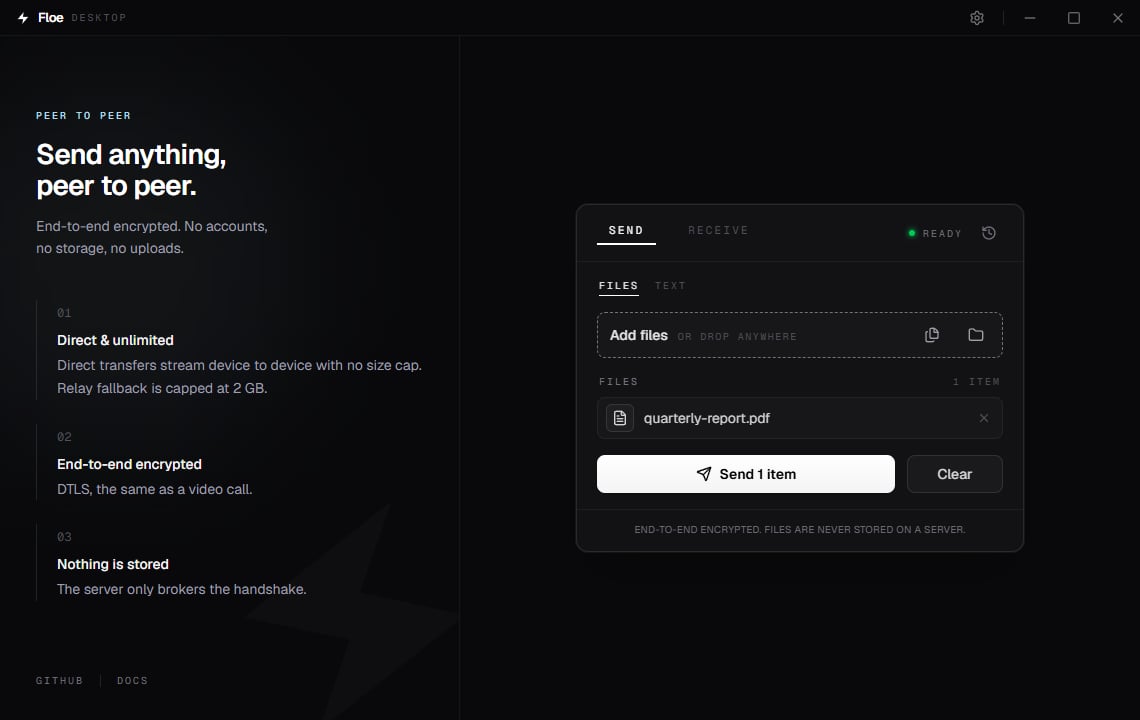
The Send tab with one file staged
Add files
There are four ways to stage files, and you can mix them:
Everything you add appears in a list under Files. Remove a single entry with the
X on its
row, or empty the whole list with Clear, beside the Send button. Clear appears only when
that tab is holding something, and while a transfer is sending its place belongs to Cancel,
so on an empty tab or mid-send there is no Clear to find. It takes only what the tab you are on
is holding (the file list on Files, the box on Text) and leaves your settings, the
Receive tab, your history and the files themselves alone. It does not ask first.
It offers Undo instead, in a bar at the bottom of the window, which puts back exactly what you
had staged, whitespace and all.
The bar shows for about ten seconds, longer while you point at it or reach it with the keyboard.
The offer behind it lasts longer than the bar does, and Ctrl Z takes it once the bar has gone.
It stands until you put something new on that same tab, clear something else, or start over.
Looking somewhere else does not spend it: switch tabs, open Settings, check History, send from
the other tab or cancel a transfer, and the bar simply steps out of the way, then comes back when
you return. Ctrl Z works only on the Send tab it came from, and is ignored while the cursor is
in a text box, so click out of the box first.
Floe holds one undo at a time. Clearing on one tab while an offer from the other is still
standing replaces it, so if you cleared a note, undo it before you clear a file list.
Ctrl R starts over, which clears the selection along with everything else on the card.
It asks first if a transfer is already moving bytes, if the text box holds a note that has not
been sent (the dialog reads “The text you typed has not been sent yet. Starting over will clear
it.”), or if you cleared a note that had never been sent and its Undo is still standing, since
starting over discards it. Clicking the Floe lockup in the title bar starts over too, with the
same confirmations, but only the shortcut is held back while you are typing.
Adding the same path twice does nothing, so dragging a file you already staged is safe. One
edge worth knowing: if you add a folder and a file that lives inside it, that file is sent
twice, because the folder is walked separately.
Paste to send
Ctrl V handles two different clipboard contents:
- Files copied in File Explorer are staged by path, so nothing is duplicated on disk no matter how large they are.
- An image, such as a screenshot from
WinShiftS, is written to a temporary file namedpasted-image-<date>-<time>-<ms>.png, for examplepasted-image-20260820-143512-407.png, and staged from there. The timestamp runs down to the millisecond, so two pastes in the same second stay apart, and it is also the name the person receiving sees. Floe clears these temporary files the next time it starts.
Folders
Folders are sent as folders. Floe walks the folder, sends each file, and the person receiving gets the same structure inside their save folder. There is no zipping step on either side, and no size limit on a direct connection.Send a text note
Switch from Files to Text and type or paste into the box. Floe sends the text as a file calledmessage.txt, so the person receiving does not need Floe Desktop: any Floe peer, in a
browser or on the command line, receives it as an ordinary file.
Press Ctrl Enter in the box to send without reaching for the button.
Share the code or link
Click Send. Floe registers a room and shows three ways to hand it over.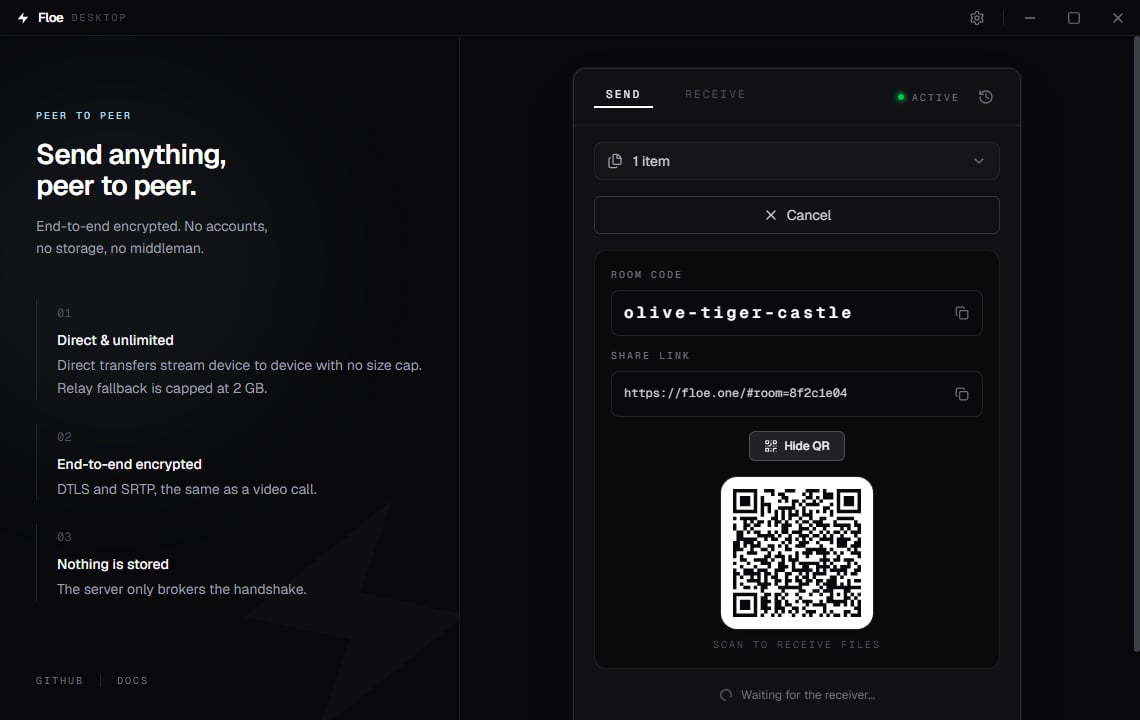
The share panel, with the QR code shown
A phone receives in its browser. On iOS, tell them to use Download ZIP rather than saving
files one at a time, which behaves inconsistently there. See
Receiving files.
The room code expires 10 minutes after you click Send. The link keeps working for as long as
Floe is still waiting, so for a longer wait, share the link.
A room takes exactly one receiver. While someone is connected, a second person opening the same
link gets an error. Once the recipient has joined, the room code stops working, and once your two
devices have started connecting, the link turns away anyone on a network other than yours or the
recipient’s. Send again for a second recipient. See
How a transfer works.
Floe handles one transfer at a time, so wait for the current one to finish before starting the
next. There is no queue.
While it sends
The transfer starts by itself as soon as the other side joins. Nothing to confirm. The badge at the top right of the card tells you what is happening:
Below it, a progress bar shows the current file, the percentage, the speed, and the estimated
time remaining. Cancel stops the transfer at any point.
You can minimize the window and the transfer keeps running, because the transfer happens in
Floe’s core rather than in the window. Windows is also asked not to sleep while a transfer is
connected. Closing the window during a transfer asks first; choosing Close anyway stops
the transfer and closes Floe.
When it finishes you get a Windows notification and the card reads Sent 1 item, or
Sent 4 items for four. It counts what you staged, not what crossed the wire, so a single folder
holding fifty files reads Sent 1 item. A text note is one item too, since it travels as a
single
message.txt.
Send from File Explorer
If you turned on Show in right-click menu, right-click one file or a selection of files in File Explorer and choose Send with Floe. On Windows 11 it sits under Show more options. Floe opens with those files already staged, or, if Floe is already running, brings the existing window forward and adds them to it. A selection of several files works: Windows launches Floe once per selected file, and every one of them lands in the same window. This entry is only available in the build from GitHub. See Installation.Size limits
Direct connections have no size limit. If the connection has to fall back to the encrypted relay, transfers are capped at 2 GB per session. When Floe can confirm the route is relayed, it blocks an oversized transfer before any data moves, with the error “relay connections are capped at 2 GB”. If the route cannot be determined, Floe lets the transfer start rather than blocking a legitimate one, so in that case a relayed transfer over 2 GB can still fail partway through. Turning on Hide my IP forces every transfer through the relay, so the 2 GB cap always applies while it is on. Floe says so in the error when that is what caused the block. See File size limits.Keyboard
Ctrl O adds files, Ctrl Enter sends, Ctrl Z undoes a Clear, Ctrl R starts
over. The full list is in Keyboard shortcuts.